Editable Dog Training Log Template 3: Track Commands and Progress
Consistency is the secret ingredient to a well-trained dog. Whether you're teaching basic obedience to a new puppy or refining advanced skills with an adult dog, tracking progress is what transforms casual practice into measurable results. The Editable Dog Training Log Template 3 gives you a structured, visually clear way to document every training session without adding complexity to your routine. It's a practical design asset built for real-world use, not just something that looks nice sitting on your desk.
What Makes This Training Log Different
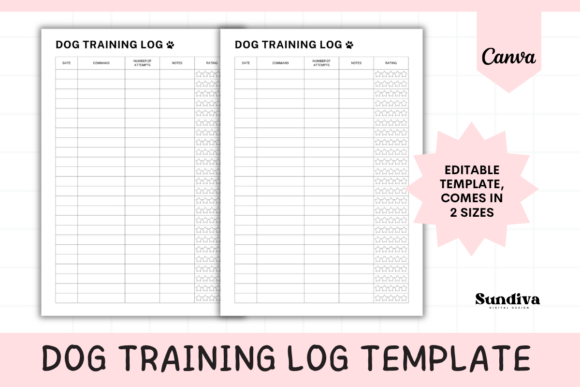
Most dog training logs either overwhelm you with too many fields or leave out the details that actually matter. Editable Dog Training Log Template 3 strikes a balance. Each row covers five essential data points: Date, Command, Number of Attempts, Notes, and a 5-Star Rating system. That last element is the standout feature. Instead of writing paragraphs about how your dog performed, you assign a star rating and move on. At a glance, you can scan the page and immediately see which commands need more practice and which ones your dog has mastered.
The layout fits 24 entries per page, which gives you roughly a month of daily training sessions or several weeks of multi-command practice. The visual design is clean and uncluttered, with enough white space to keep things readable even when you're filling it in quickly between sessions. It doesn't try to be flashy. It does its job well, which is exactly what you want from a tracking tool you'll use repeatedly.
What sets this apart from a handwritten notebook or a spreadsheet is the combination of structure and flexibility. The template comes in both PDF (print-ready) and editable Canva formats, available in A4 and US Letter sizes. That means you can print it out and keep it on a clipboard during training, or edit it digitally on your computer or phone through Canva's free platform. The Canva template lets you adjust colors, fonts, and layout elements if you want the log to match your personal style or your professional branding.
Who Benefits From a Structured Training Log
If you're a dog owner doing obedience training at home, this template gives your sessions a sense of purpose. It's easy to practice the same three commands every day without realizing your dog hasn't progressed on "stay" in two weeks. The star rating system makes those patterns visible. You'll notice when a command consistently rates two or three stars, and that's your signal to adjust your approach or dedicate more time to that specific skill.
Professional trainers managing multiple dogs find this format especially useful. When you're working with five or ten dogs in a week, details blur together. A structured log per dog keeps records organized and makes it simple to communicate progress to owners. You can show them the star ratings, point out the notes column where you documented specific behaviors, and give them a clear picture of where their dog stands. That kind of transparency builds trust and demonstrates professionalism.
Anyone doing structured puppy training will appreciate the accountability a log creates. Puppies learn fast but also regress quickly if practice isn't consistent. Having a physical or digital log sitting on your counter or saved on your phone serves as a daily reminder to train. It turns training from something you do "when you remember" into a documented habit.
How to Get the Most Out of the Template
Start by deciding whether you prefer a printed or digital workflow. If you train outdoors or in spaces where your phone might get muddy or dropped, printing the PDF and keeping it on a clipboard is the practical choice. If you like having everything on your devices, the Canva version works well on a computer and is accessible through the Canva app on your phone. Just keep in mind that editing on a larger screen is more comfortable for detailed adjustments.
Use the Notes column intentionally. Don't just write "good" or "okay." Instead, jot down specifics: distractions present, time of day, treat type used, your dog's energy level before the session. Over time, these details reveal patterns. You might discover your dog performs "down" perfectly in the morning but struggles after dinner. That kind of insight is what separates casual training from effective training.
The 5-star rating should reflect your honest assessment. A five-star rating means your dog performed the command quickly, correctly, and with minimal prompting. Three stars suggests the dog completed the command but needed encouragement or multiple cues. One star means the command wasn't followed or required significant help. Keeping your rating criteria consistent across sessions makes the data meaningful over time.
Customizing the Template for Your Needs
Since the Canva version is fully editable, you can adapt it beyond basic obedience tracking. Some trainers use it for agility training by modifying the Command column to list specific obstacles. Others use it for behavioral modification work, replacing "Command" with "Situation" and tracking how their dog reacts to triggers like strangers, other dogs, or loud noises.
If you're a professional trainer, consider customizing the template with your brand colors and logo before printing copies for clients. It's a small touch that reinforces your brand identity and makes your materials feel polished. The template's clean layout works well as a foundation for this kind of personalization without requiring advanced design skills.
For multi-dog households, print separate logs for each dog. Trying to track two dogs on the same page gets confusing quickly. Individual logs keep each dog's progress distinct and make it easier to identify where each one needs individual attention.
Making Training a Documented Habit
The real value of Editable Dog Training Log Template 3 isn't the template itself. It's the habit it encourages. Dogs thrive on repetition and consistency, and so does effective training documentation. When you commit to logging each session, you create a record that shows your progress over weeks and months. On days when training feels frustrating and you wonder if your dog is learning anything, you can flip back through the log and see how far you've come. That perspective keeps you motivated and keeps your dog learning.
This is a digital product, so you'll receive the files instantly after purchase. No shipping, no waiting. Open the PDF and print it, or log into your free Canva account and start editing right away. Whether you're a first-time dog owner or a seasoned trainer, having a reliable tracking system in place makes every training session count.