Mastering Sock Sublimation: The No Show Sock Jig Bundle
Getting a perfectly centered, vibrant design on a tiny, curved piece of fabric like a no-show sock can be one of the most frustrating parts of sublimation printing. It’s a precise game where millimeters matter, and without the right guide, you’re often left with crooked graphics, wasted blanks, and wasted time. That’s where a dedicated jig system transforms the process from a headache into a smooth, professional workflow. The No Show Sock Jig Bundle Canva Template is a comprehensive toolkit built for exactly this purpose, designed to give you the accuracy and repeatability needed for consistent, high-quality results.
Anatomy of the Bundle: What’s Inside the Template Package
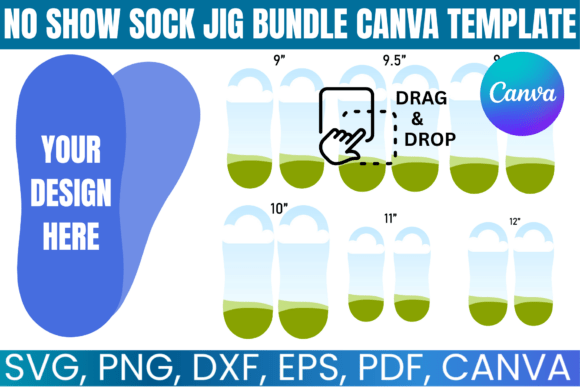
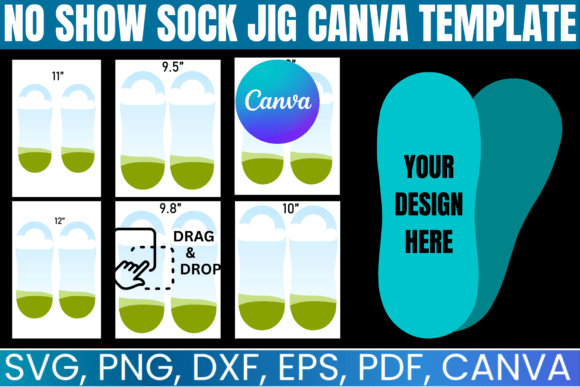
This isn’t a single file; it’s a complete ecosystem for sock design and production. The core of the No Show Sock Jig Bundle Canva Template is its versatility. You receive a set of blank sock jig templates meticulously formatted for standard 8.5 x 11 inch pages, ensuring they print correctly on any home or office printer. But the real power lies in the file variety. The included SVG and DXF files are engineered for compatibility with major cutting machines like Cricut and Silhouette. This means you can cut your own reusable jig guides from cardstock or thin plastic with pinpoint accuracy, creating a physical template that aligns perfectly with your digital design.
For designers who prefer a visual, drag-and-drop workflow, the editable Canva file is a game-changer. It allows you to import your artwork, scale it, position it on the sock template, and visualize the final placement before ever touching a printer or heat press. This is invaluable for creating custom sock inserts and complex, all-over patterns. The bundle also provides a PNG with a transparent background for use in design software like Adobe Photoshop or Illustrator, and a PDF with a solid white background for straightforward printing. This multi-format approach ensures the template works within your existing creative process, whether you’re a Canva enthusiast or a professional using advanced vector software.
From Template to Tangible: Practical Applications for Makers
The utility of this adult sock jig template extends far beyond simple hobbyist projects. For small businesses and print-on-demand entrepreneurs, consistency is currency. This bundle acts as a foundational design asset, enabling you to build a production line for custom socks. Imagine fulfilling an order for a dozen pairs of branded no-show socks for a client. Using the jig, you can ensure every single sock has the logo or pattern placed identically, projecting a level of professionalism that builds customer trust and brand identity.
The applications are diverse. Here’s where it truly shines:
- Corporate and Promotional Merchandise: Create subtle, branded socks for company swag, trade show giveaways, or team uniforms. The clean, accurate placement makes the end product feel premium.
- E-commerce Storefronts: Offer a range of niche designs—from quirky patterns to sports team logos—knowing you can replicate each design flawlessly for every customer order.
- Personalized Gifts: Design custom socks for weddings (with dates or initials), sports teams, family reunions, or as unique holiday gifts. The jig takes the guesswork out of alignment.
- Sublimation Blank Testing: Before committing to a large batch, use the jig to test how a new design or a new brand of sublimation blank handles color and alignment. It’s a risk-management tool for your production process.
Optimizing Your Design Workflow
Using the No Show Sock Jig Bundle Canva Template effectively is about more than just loading a file. It’s about integrating it into a thoughtful design workflow. Start by designing your artwork at the actual print size, using the template as your canvas. Pay close attention to the toe and heel areas—these are high-stretch zones that can distort graphics. A good practice is to place critical text or intricate details in the mid-foot area where the fabric stretches less.
When you move to production, the physical jig you create from the SVG file becomes your most trusted tool. Place the sock blank onto the jig, ensuring the seams are aligned with the guide marks. Then, use the printed design from your PDF or PNG as a second layer to visually confirm placement before pressing. This two-step verification—digital template to physical jig—dramatically reduces errors. For those building a brand identity around apparel, this consistency in packaging design (the sock itself is the package) directly influences customer perception and repeat business.
Strategic Considerations for Long-Term Use
Treat this bundle not as a one-time project fix, but as a long-term design asset. As your skills and business grow, your use of the template will evolve. You might start with simple single-color logos and advance to complex, full-bleed patterns. The Canva file is particularly useful for experimenting with these more intricate designs because of its user-friendly interface for layering and arranging elements.
Consider the font pairing and overall graphic style you apply to the socks as part of your broader brand identity. The sock template is a small canvas, so designs need to be bold and clear. A strong, simple sans serif font often works better than a delicate script for readability. Think of the sock jig as a component in your larger marketing and content creation toolkit. The ability to produce high-quality, custom apparel quickly allows you to react to trends, create limited editions, or fulfill small-batch corporate orders that would be impractical with traditional manufacturing.
Ultimately, the value of the No Show Sock Jig Bundle lies in its ability to remove a significant technical barrier. It gives you the framework to focus on what you do best: the creative design. By ensuring the technical execution—alignment, sizing, and placement—is handled by a reliable system, you free up mental energy to experiment, innovate, and build a product line that stands out for its quality and creativity. For the serious crafter, designer, or entrepreneur, it’s a foundational tool that turns a challenging sublimation project into a scalable and rewarding business venture.