Michaels 18.5oz Canva Frame Tumbler: A Digital Design Asset
For anyone working in the custom drinkware or print-on-demand space, the foundation of a great product often starts with the mockup. The Michaels 18.5oz Canva Frame Tumbler offers a specific solution for this, providing a digital template designed to streamline the creation of realistic product visuals without the need for physical inventory or complex photography setups.
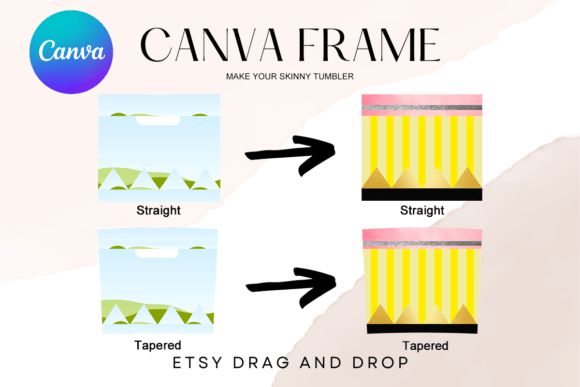
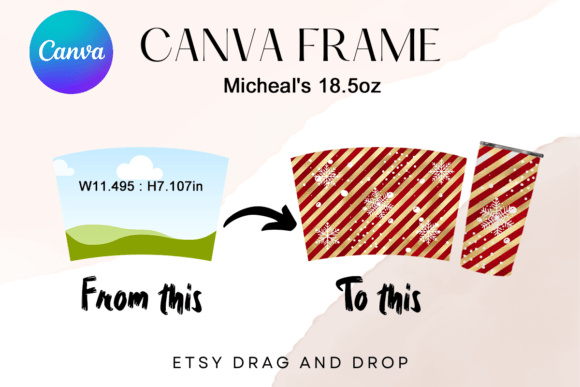
It is important to clarify what this asset is. This is not a physical product that arrives in the mail. There are no props, no packaging, and no shipping costs. You will receive one PDF file containing a direct link to a custom-made Canva template. Once accessed, you have a fully editable frame designed to wrap around standard tumbler dimensions. The specific measurements are W: 11.495 x 7.107 inches, which accommodates the wrap area of an 18.5oz skinny tumbler. This makes it an essential tool for designers looking to visualize their packaging design or sublimation art before production.
Understanding the "Frame" Concept in Canva
Unlike standard stock images or rigid PNG files, this asset utilizes Canva’s native "frame" functionality. When you open the link, you are presented with a pre-masked shape. The visual personality of this template is defined by its utility; it is a clean, transparent container. The appeal lies in its simplicity. It does not impose a style on your artwork; rather, it serves as a neutral vessel for your logo design or illustration.
The technical specifications highlight its versatility. Because the template is built on a transparent layer, it integrates seamlessly into various backgrounds. Whether you are placing your design on a digital shelf for an e-commerce store or using it in social media graphics, the lack of a pre-baked background allows for total creative control. This is particularly useful for brand identity work, where color accuracy and context are paramount.
Practical Application for Entrepreneurs and Crafters
The primary value of the Michaels 18.5oz Canva Frame Tumbler is speed. For small business owners and Etsy sellers, the ability to generate a professional product mockup in minutes is a competitive advantage. Instead of spending hours in Photoshop masking out reflections and shadows, you simply drag and drop your artwork into the frame.
Here is how this asset fits into real-world workflows:
- Sublimation Testing: Before you waste ink and a physical tumbler, you can wrap your pattern around this frame to check for scale and alignment issues. If your repeating pattern looks disjointed at the seam, you will see it immediately.
- Client Presentations: If you are a graphic designer pitching a tumbler collection to a corporate client, presenting the artwork on a realistic 3D-looking template is far more persuasive than showing a flat rectangle.
- Inventory Visualization: If you sell custom tumblers but only have a few physical colors in stock, you can use this template to show customers what their specific design would look like on a different background color or texture.
Design Considerations and Usability
One of the standout features of this digital file is that it is not an SVG or a static PNG. It is an editable Canva template. This distinction matters significantly for accessibility. You do not need expensive software like Adobe Illustrator to use it. Anyone with a free or Pro Canva account can access and modify the file.
The dimensions (11.495 x 7.107 inches) are approximate, but they are calibrated to the standard aspect ratio of an 18.5oz tumbler. The "easy drag & drop" nature of the file means that even those with minimal technical skills can achieve a high-quality result. However, for advanced users, the ability to size the template up or down offers flexibility. If you need a thumbnail for a website or a high-resolution image for a print catalog, the vector-like nature of the Canva frames allows for scaling without immediate pixelation, provided your source artwork is high resolution.
When working with this frame, consider the curvature of the tumbler. A flat design will often look distorted when wrapped. To achieve the most professional result, use the frame to test how your typography and imagery wrap around the cylindrical form. This is where modern typography meets practical application; ensuring your text remains legible as it curves is a crucial step in editorial design for physical products.
Optimizing for Vinyl and Sublimation
The template is described as "easy for vinyl sublimation." This is a key feature for the crafting community. When designing for sublimation, the bleed area and seam alignment are critical. This template acts as a guide. By placing your artwork into the frame, you can visualize exactly where the "back seam" of the tumbler will be, allowing you to position critical design elements away from the edges where they might get cut off during the heat press process.
For those working with vinyl decals, the transparency of the layer allows you to see exactly how your cut lines interact with the shape of the tumbler. It removes the guesswork from the production process, ensuring that what you design is what you produce.
Strategic Value for Digital Marketing
Beyond the production phase, the Michaels 18.5oz Canva Frame Tumbler serves as a powerful design asset for marketing. In a crowded digital marketplace, the quality of your imagery directly impacts conversion rates. A poorly lit photo of a physical tumbler can undermine the perceived value of a high-quality product. Conversely, a crisp, well-designed mockup using this template elevates the product to look premium.
Use this asset to create cohesive content for Instagram, Pinterest, and Facebook ads. Because the template is consistent, you can create a series of posts showcasing different designs, all with the same lighting, angle, and perspective. This consistency builds brand identity and makes your shop look curated and professional. It is a practical application of visual hierarchy; by keeping the container the same, you allow the design itself to be the focal point.
Ultimately, this digital file bridges the gap between a creative idea and a sellable product. It empowers hobbyists to compete with larger brands by providing access to the same level of presentation quality, all within the accessible environment of Canva. Whether you are a seasoned designer or a hobbyist just starting out, this frame offers a reliable, efficient way to bring your tumbler designs to life digitally.
Michaels 18.5oz Canva Frame Tumbler: Your Digital Design Blueprint
Creating professional product mockups for drinkware shouldn't require a photography studio or complex software. The Michaels 18.5oz Canva Frame Tumbler provides a straightforward digital solution, offering a pre-built template that lets you visualize your designs on a standard tumbler format instantly. This asset is designed for speed and practicality, serving as a bridge between your creative concept and a polished presentation.
Let's be clear about what you're getting. This is a digital file only—no physical tumbler will be shipped. You receive a single PDF containing a link to a custom-made Canva template. The template itself is a frame, precisely sized at W: 11.495 x 7.107 inches, which corresponds to the printable wrap area of a popular 18.5oz skinny tumbler. Its core appeal is its simplicity and integration into a platform millions already use, making it an accessible design asset for entrepreneurs, crafters, and designers alike.
A Practical Tool for the Modern Designer
Think of this template not as a finished piece, but as a versatile container. The frame’s visual personality is neutral by design; it’s a clean, transparent shape that exists to showcase your artwork. This makes it incredibly useful across various projects. For a small business owner, it’s a quick way to generate a product image for an online store. For a graphic designer, it’s a tool to present a logo design or pattern collection to a client in a realistic context.
Because it operates within Canva, the workflow is intuitive. You drag your artwork into the frame, and Canva automatically masks it to the tumbler’s shape. This eliminates the tedious process of manually warping and clipping in advanced software. The transparent background layer is a key feature, allowing you to place your mockup onto any surface—a marble countertop, a wooden table, or a solid brand color—without worrying about clashing backgrounds. This flexibility is essential for creating cohesive social media graphics and marketing materials.
Streamlining Production and Presentation
The real-world value here is in efficiency and accuracy. Before you commit to printing a physical tumbler, you can use this frame to check your design’s scale, alignment, and overall composition. Does the pattern repeat seamlessly? Is the text legible as it curves around the cylinder? This template lets you answer those questions visually.
Here are a few practical applications:
- Sublimation and Vinyl Alignment: The template helps you visualize the seam. You can position critical elements of your design to avoid the back edge where the wrap meets, preventing cut-off text or imagery during production.
- Client Mockups: Presenting a design on a realistic tumbler frame is far more compelling than showing a flat graphic. It helps clients visualize the end product, which can accelerate approvals and sales.
- Inventory-Free Product Listings: If you operate a print-on-demand model, you can use this frame to list countless designs without ever holding physical stock. Each mockup looks consistent and professional.
Technical Considerations and Best Practices
It’s crucial to understand that this is an editable Canva template, not a static image file like a PNG or SVG. This distinction matters. While you can’t download it as a vector file for editing in Adobe Illustrator, you gain the benefit of Canva’s user-friendly interface. The approximate dimensions can be scaled up or down within Canva, though for best results, your source artwork should be high-resolution to avoid pixelation when enlarged.
When using the frame, pay attention to the curvature. A perfectly flat design will naturally distort when wrapped. Use this as a testing ground for your typography. A bold, simple font might hold up well, while a delicate script could become illegible at the edges. This is where practical design knowledge comes in—understanding how visual hierarchy translates from a flat screen to a three-dimensional object.
The template’s transparency also means you should consider your final background. A dark design on a light tumbler mockup might disappear if placed on a dark website background. Planning your compositions with the end-use in mind ensures your mockups are not just beautiful, but functional for web design or print materials.
Elevating Your Brand Consistency
For anyone building a brand identity, consistency is key. Using the same mockup frame across all your tumbler designs creates a unified look for your shop or portfolio. This visual consistency builds recognition and professionalism. Customers learn to associate that specific style of presentation with your brand, which builds trust.
This asset also supports a wide range of styles. Whether you’re working with a modern typography layout, a handwritten font for a personal touch, or a serif font for a classic feel, the frame provides a neutral stage. It allows your chosen typeface and artwork to be the star, which is the hallmark of good editorial design and packaging design.
In essence, the Michaels 18.5oz Canva Frame Tumbler is a pragmatic tool. It solves the specific problem of creating attractive, consistent product mockups without specialized skills or software. For the entrepreneur, it’s a time-saver. For the designer, it’s a presentation enhancer. For the crafter, it’s a planning aid. By integrating it into your workflow, you can focus more on the creative work and less on the technical hurdles of showcasing it.