Design Custom Chocolate Clutch/Purse Favors with Canva
Creating personalized party favors doesn't have to mean hours of cutting, gluing, and frustration. For anyone looking to add a professional, custom touch to their next event, the Canva Frame Chocolate Clutch/Purse 2.6oz template offers a surprisingly elegant and efficient solution. This isn't just a piece of paper you wrap around a candy bar; it's a pre-formatted design asset that transforms a standard king-size chocolate, like a Hershey's bar, into a miniature clutch or purse. The visual appeal lies in its clever construction. When assembled, the wrapper mimics the shape of a stylish handbag, complete with a folded flap that acts as the "clasp." This immediate visual recognition elevates a simple treat into a thoughtful, Instagram-worthy gift. Its personality is charming and playful yet polished, making it suitable for sophisticated bridal showers and fun children's parties alike.
Practical Applications for Designers and Entrepreneurs
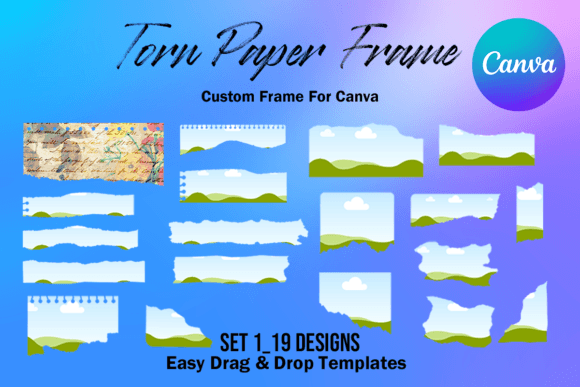
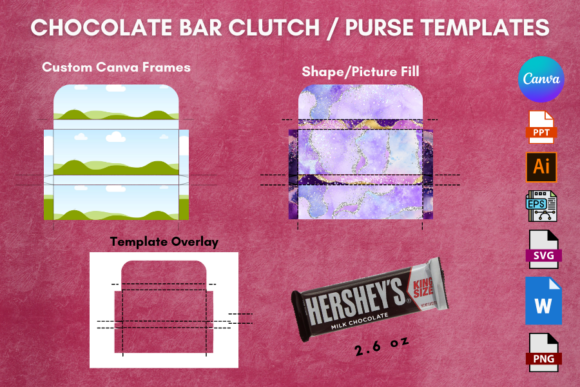
The true value of this template is its versatility. It's a prime example of how modern typography and graphic design principles can be applied to physical products. The template is formatted to fit a standard 8.5x11-inch sheet, making it accessible for anyone with a home printer or access to a print shop. For small business owners, this is a game-changer. Imagine a boutique clothing store using these as a thank-you gift with purchase, or a real estate agent leaving a branded chocolate clutch as a closing gift. The design possibilities are endless, thanks to the multiple file formats provided. You'll receive the template as a Canva file with customized frames, allowing for intuitive drag-and-drop design. It also comes in PPT, MS Word, EPS, SVG, Illustrator, Photoshop, and PNG formats, ensuring compatibility with virtually any design software you prefer, from beginner-friendly tools to professional-grade applications.
Choosing the Right Template for Your Project
Two distinct versions of the template are included, each serving a different design workflow. Understanding which to use will save you time and ensure a better result.
- The Individual Panel Template: This version lays out the separate pieces of the clutch—the front, back, flap, and side panels—as distinct shapes. This is ideal for projects where each panel has a unique design, different text, or specific graphical elements. It gives you granular control, perfect for complex, multi-layered designs.
- The Full Outline Overlay Template: This version shows the complete, unfolded outline of the clutch as a single, continuous shape. This is your best choice for creating a seamless, all-over pattern or a consistent background design that wraps around the entire bar. It's excellent for achieving a cohesive brand identity look with logos, textures, or repeating motifs.
When evaluating your project, consider the final message. Is it a detailed invitation with event specifics on different panels? The individual panel template is your friend. Is it a branded thank-you where the company logo and colors need to flow uninterrupted? The overlay template is the way to go.
Designing for Impact and Brand Consistency
A chocolate clutch is more than a gift; it's a tactile piece of your brand's visual hierarchy. The design you create influences brand perception immediately. A clean, minimalist design using a strong sans serif font conveys modern professionalism. A whimsical script or handwritten font paired with soft colors suggests warmth and personal touch. For logo design and packaging design projects, this template acts as a physical mockup. You can test how your brand's color palette and typography translate to a small, three-dimensional object. This kind of real-world application is invaluable for building a recognizable brand identity.
Think about font pairing carefully. Since the space is limited, readability is paramount. A bold, clear display font for a name or event title can be paired with a simple, legible serif font or sans serif font for details like dates and times. Avoid overly ornate scripts for small text. The goal is readability at a glance. This process mirrors best practices in editorial design and web design, where a clear typographic hierarchy guides the viewer's eye.
From Digital Design to Party-Ready Favors
The workflow is straightforward. Start by opening the Canva file. The frames are set up, so you simply click to upload your graphics or choose elements from Canva's library. If you're using Adobe Illustrator or Photoshop, the EPS or SVG files are fully editable vector paths, allowing for infinite scaling and precise adjustments. For those more comfortable with office software, the PPT and MS Word versions provide a familiar interface for basic customization.
Once your design is complete, printing on a heavy cardstock is recommended for durability and a premium feel. After printing, the assembly is simple: cut, fold along the designated lines, and secure with a dab of glue or a double-sided tape. The final product is a sturdy, charming chocolate clutch that feels substantial in the hand. This tactile quality enhances the audience engagement—it's a gift people remember and talk about. Whether for a bridal shower, baby shower, holiday gift, or corporate event, this template provides a practical, creative foundation for making something special. It's a versatile piece of design assets that bridges the gap between digital creativity and physical celebration.