Design Dynamic Team Graphics with the Cheerleader & Dancer Canva Template
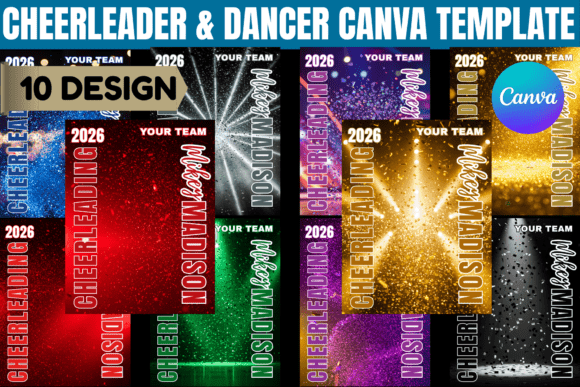
Capturing the energy and precision of a cheer squad or dance team in a single design requires more than just a camera; it demands a layout that understands movement and rhythm. The Cheerleader & Dancer Canva Template is built specifically to bridge the gap between raw team photos and professional-grade graphics. It is not merely a collection of static boxes but a structured framework designed to handle the visual chaos of pom-poms, uniforms, and high-energy poses. By utilizing a layered architecture, this template allows you to create visual hierarchy instantly. You place the athletes in the foreground while the background—often featuring dynamic starburst effects and bold geometric shapes—recedes just enough to provide context without competing for attention.
Visually, the template leans into a modern, high-contrast aesthetic. It moves away from the dated, cluttered scrapbook look often associated with school spirit materials. Instead, it embraces clean lines and strategic negative space. The personality of the design is inherently energetic and celebratory, characterized by strong typography blocks that anchor the image. Whether you are using a sans serif font for the main headers to convey modernity, or a script font for the athlete's name to add a personal touch, the layout accommodates various typographic choices. The "starburst" effects mentioned in the design are not just decorative; they are directional tools meant to guide the viewer’s eye toward the central subject. This makes the Cheerleader & Dancer Canva Template particularly effective for social media graphics where you have only a split second to capture a viewer's attention before they scroll past.
Practical Applications: From Senior Night to Social Media
One of the most significant hurdles in editorial design and event marketing is time constraints. Coaches and team parents often find themselves scrambling to produce materials for Senior Night or competitions with very little lead time. This is where the utility of an editable template shines. Because the file is built in Canva, it removes the technical barrier to entry associated with complex software like Photoshop. You do not need to understand clipping masks or complex layer blending modes. Instead, you simply drag and drop photos into the designated frames.
The versatility of this design asset extends across multiple formats. For a Senior Night Banner, the template provides the necessary resolution and aspect ratio for large-format printing. You can easily scale the design to fit a 6-foot vinyl banner without pixelation, provided your source photos are high quality. Conversely, the same design principles apply when creating a Memory Mate or a digital flyer. The adaptability of the layout ensures that whether the design is viewed on a mobile screen or printed on cardstock, the visual integrity remains intact. This flexibility is crucial for maintaining a consistent brand identity for the team throughout the season.
Typography and Visual Hierarchy in Team Branding
Typography plays a pivotal role in how the final product is perceived. A Cheerleader & Dancer Canva Template serves as a canvas for your typographic choices. When customizing these files, consider the emotional weight of your fonts. A heavy, block-style display font works well for the team name or the word "CHAMPIONS," conveying strength and stability. In contrast, pairing this with a lighter serif font or a handwritten font for specific dates or quotes can soften the look and add a layer of sophistication or personality.
Readability is paramount. While it might be tempting to use an intricate script font for all text, practical application dictates otherwise. Use decorative fonts sparingly—perhaps for the athlete's name or a specific slogan—while keeping the team name and vital information in a clean, legible typeface. This approach ensures that the design functions effectively as a poster viewed from a distance. The template’s layout usually accommodates this by offering distinct zones for headers and body text, allowing you to experiment with font pairing without compromising the design's structural integrity.
Strategic Customization and File Management
When approaching the customization of a Cheerleader & Dancer Canva Template, think like a brand strategist. Your goal is to create a cohesive set of materials. If you are creating a Senior Team Banner, consider how that design language translates to the individual player posters or the digital graphics shared on Instagram. Consistency in color palette and font selection across these different mediums strengthens the team's visual presence.
From a technical standpoint, ensure you are utilizing the layered structure of the file. Most premium templates are organized with clear labels for "Photo," "Text," and "Background." Respecting this structure makes the editing process smoother. For instance, if you want to change the background color to match the school's specific hex code, doing so within the designated background group ensures that the overlay effects (like the starbursts) remain intact and editable. This attention to detail transforms a standard template into a custom piece of logo design and marketing collateral.
Furthermore, consider the commercial aspect. If you are a coach or a booster club selling these posters as a fundraiser, ensure that the fonts included in the template are licensed for commercial use. Most high-quality Canva templates utilize fonts available within Canva’s library, which are generally cleared for these purposes, but it is always best practice to verify usage rights. This ensures that your packaging design and print materials are legally sound.
Optimizing for Print and Digital Formats
The final stage of working with the Cheerleader & Dancer Canva Template is export. For print materials, such as a Cheer Banner or a physical poster, always download the file as a PDF Print. This flattens the layers and embeds the fonts, ensuring that the print shop sees exactly what you designed. If the design includes photographic elements, the high-resolution export prevents the "fuzzy" look that often plagues amateur print jobs.
For digital use, such as a Senior Night announcement on Facebook or a team roster on a website, PNG or JPG formats are preferable. These formats maintain color vibrancy and load quickly on web servers. When using the template for web design elements, ensure the file size is optimized so it does not slow down your site's loading speed. By mastering these technical nuances, you leverage the full power of the Cheerleader & Dancer Canva Editable Template, turning a simple file into a powerful tool for celebration and recognition. Whether you are highlighting a single standout athlete or the entire squad, this approach ensures a professional, polished result every time.